August 18, 2026 / 7 min read
Anonymous File Sharing Without Sign Up: Meet Share The Doc
Share The Doc is a browser-based tool for anonymous temporary file sharing with one-time links, automatic expiry, passwords, QR codes, and an offline transfer mode.
By Ganesh Bastapure
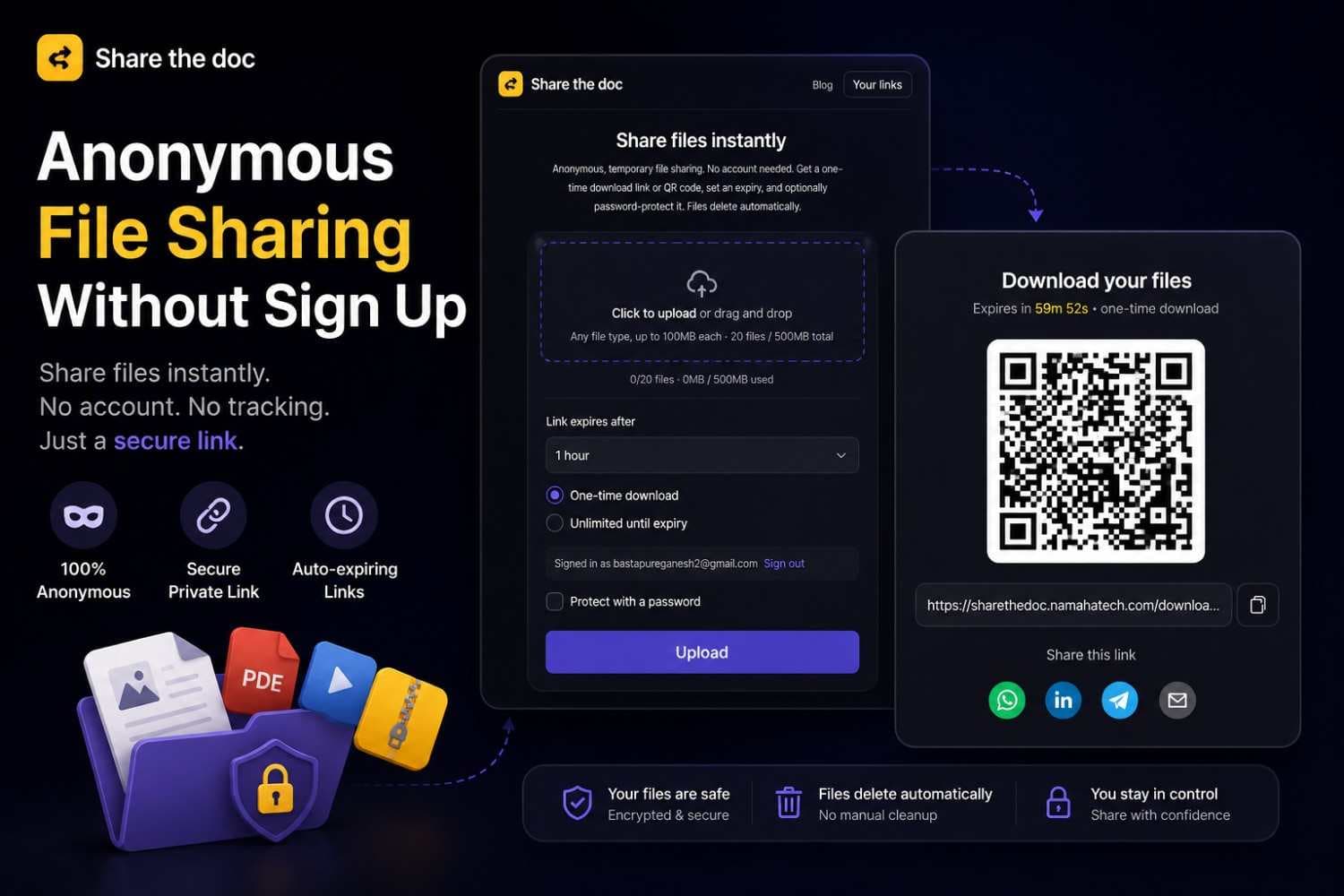
Anonymous file sharing without sign up should be simple: choose a file, create a temporary link, send it, and move on. Share The Doc is the browser-based product I built around that idea.
It removes the usual setup for quick transfers. The sender does not need to install an app or create an account for a one-time share, and the recipient only needs the link or QR code.
Why I built Share The Doc
Sending a file often turns into more work than the file itself. Email has attachment limits, cloud drives ask for permissions, messaging apps compress media, and many transfer services require an account before they reveal the useful options.
I wanted a focused utility for short-lived sharing. It should be fast for a document, screenshot, archive, or small group of files, while making the lifetime of the share clear to the sender.
How anonymous temporary file sharing works
The current workflow is intentionally short:
- Choose up to 20 files. Each file can be up to 100 MB, with a 500 MB total limit per share.
- Select an expiry of 15 minutes, 1 hour, 6 hours, or 24 hours.
- Keep the default one-time download, or add a password if the link needs another access check.
- Upload once and share the generated link or QR code.
- After the first successful one-time download or the chosen expiry, the share stops working and its files are removed automatically.
No account is required for this one-time flow. Signing in with Google is optional and is used when someone wants a link that supports repeated downloads until expiry, plus a dashboard for their active shares.
The features that make it useful
One-time download links
One-time mode is enabled by default. The backend consumes the share atomically when a valid download begins, so two requests racing for the same link cannot both claim the one available download.
Automatic expiry
Every online share has an explicit lifetime. Access checks enforce that expiry immediately, while background cleanup removes expired, consumed, or abandoned objects from storage.
Optional password protection
A sender can protect a share with a password. The download manifest and signed file URLs are not returned until the password has been verified, and repeated failed attempts are limited.
Link and QR sharing
The result page provides a normal URL and a QR code. The link is convenient for chat or email, while the QR code is faster when moving a file from a laptop to a phone beside you.
Offline file transfer through animated QR codes
Share The Doc also includes an offline mode for situations with no internet, WiFi, or Bluetooth. The sender splits a small file into checksummed chunks and displays them as a repeating sequence of QR codes. The receiving device scans the sequence with its camera and rebuilds the original once every chunk has arrived.
Because missed frames appear again on the next loop, the transfer can recover from a brief blur or camera movement. This mode is best for documents, photos, and other small files rather than large videos.
A privacy model that stays understandable
The online sharing mode currently uses temporary cloud object storage. Files are accessible through short-lived signed download URLs, and the share can be limited by expiry, one-time consumption, and an optional password.
That is different from claiming that the current online mode is peer to peer or end-to-end encrypted. Being precise about that boundary matters. The product gives users control over how long a file remains available, while the offline QR mode avoids a network connection entirely.
Engineering it as a real product
Share The Doc is built with Next.js, TypeScript, MongoDB, Cloudflare R2, and a tested API layer. Uploads go directly to object storage through presigned requests, validation is shared between the browser and server, and download state is handled explicitly for locked, expired, consumed, and active shares.
The less visible details took the most care: preventing crawlers from consuming one-time links, verifying passwords before exposing file URLs, allowing an in-progress download to finish before cleanup, and keeping anonymous transfers separate from signed-in history.
Future scope: peer-to-peer connection sharing
The next major direction is connection-based peer-to-peer sharing. Instead of always uploading a file first, two active devices could pair with a short code or QR code and transfer through a direct browser connection.
The planned experience would include:
- A QR code or short pairing code to connect sender and receiver.
- Direct device-to-device transfer when the network path allows it.
- A small signaling service that introduces the devices without storing the file.
- Clear progress, cancellation, integrity checks, and receiver approval before transfer.
- A relay or temporary-link fallback when a direct connection cannot be established.
Peer-to-peer mode would complement the existing temporary-link model, not replace it. Direct transfer is ideal when both devices are online at the same time. Temporary links remain useful when the recipient will download later. A hybrid product can choose the right path without making users understand the networking underneath.
Try Share The Doc
You can try Share The Doc in your browser. Choose a file, set its lifetime, and share it without creating an account.
The product is still evolving, but its goal is stable: make temporary file sharing feel like a small desktop utility, even though it runs entirely in the browser.
Frequently asked
- Can I share files without creating an account?
- Yes. Share The Doc allows anonymous one-time file sharing without an account. Sign-in is only required for links that allow repeated downloads until expiry and for managing those shares in the dashboard.
- How long do files stay available?
- The sender chooses 15 minutes, 1 hour, 6 hours, or 24 hours. A one-time link also stops working after its first successful download. Expired and consumed files are removed automatically.
- Is Share The Doc peer to peer?
- The current online mode uses temporary cloud storage and signed download URLs. The offline animated QR mode transfers without a network. Direct browser-to-browser peer-to-peer sharing is planned as a future connection mode.
- Can I transfer a file without internet or WiFi?
- Yes. Offline mode displays the file as a repeating sequence of QR codes on one screen. A second device scans those codes with its camera and reconstructs the file without internet, WiFi, or Bluetooth.